Introduction
NestLens is an elegant debugging and monitoring assistant for NestJS applications, inspired by Laravel Telescope. It provides deep insights into your application's behavior during development with a beautiful, real-time dashboard.
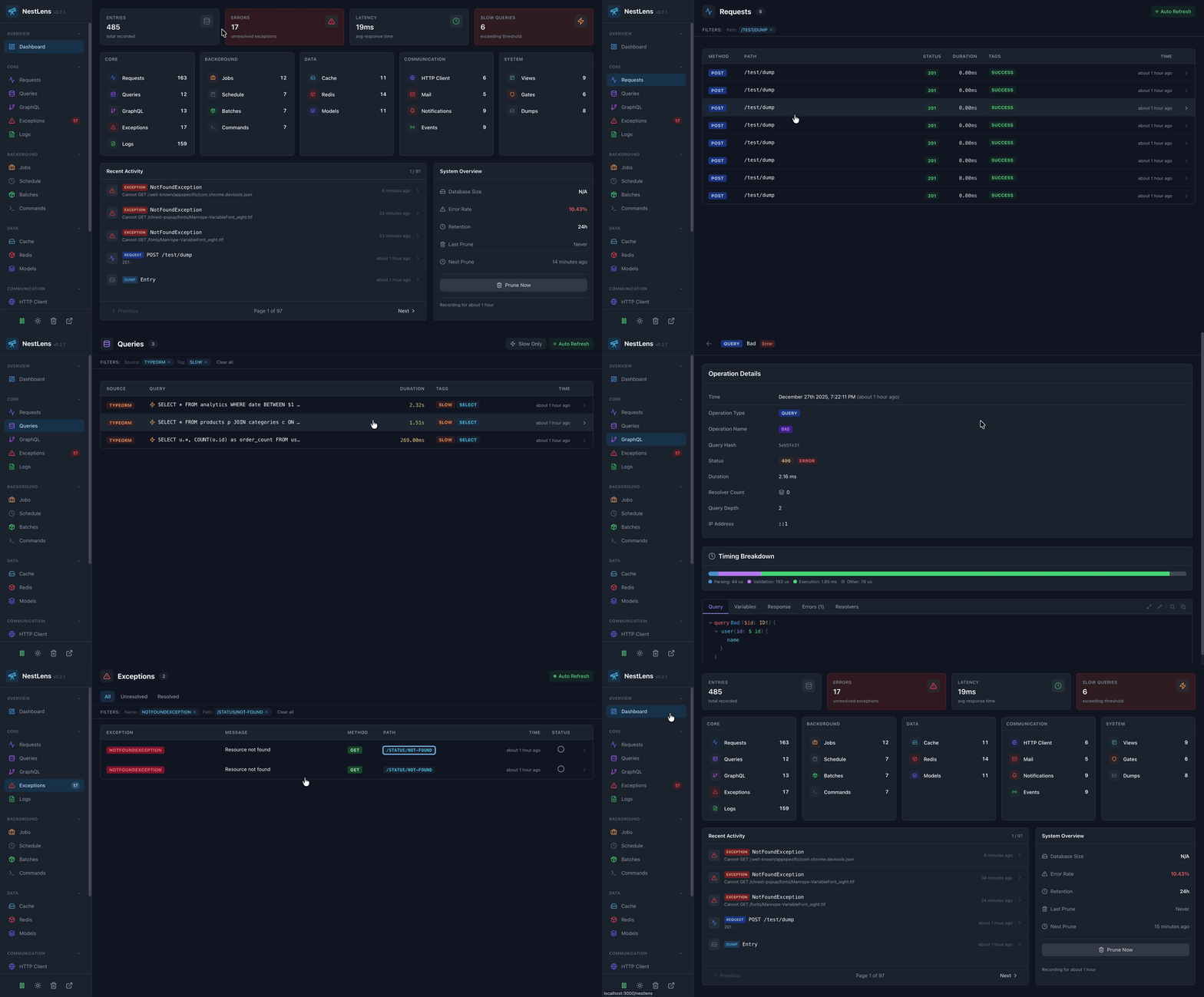
What is NestLens?
NestLens captures and visualizes everything happening in your NestJS application:
- HTTP Requests - Track all incoming requests with headers, body, response, and timing
- Database Queries - Monitor SQL queries with slow query detection
- Exceptions - Capture errors with full stack traces and request context
- Application Logs - View all log entries with level filtering
- Background Jobs - Track Bull/BullMQ queue jobs
- Scheduled Tasks - Monitor cron jobs and scheduled tasks
- Cache Operations - Track cache hits, misses, and operations
- And much more... - 19 watchers in total!
Why NestLens?
| Feature | Description |
|---|---|
| Zero Configuration | Works out of the box with sensible defaults |
| 19 Watchers | Complete visibility into every aspect of your app |
| Beautiful Dashboard | Modern React UI with dark mode support |
| Family Tracking | Group related entries by request or operation |
| Automatic ORM Detection | Built-in support for TypeORM and Prisma |
| Express & Fastify | Works with both NestJS HTTP adapters, no extra setup |
| TypeScript Native | Full type safety throughout |
| Production Ready | 1,400+ tests ensuring quality |
Quick Preview
app.module.ts
import { Module } from '@nestjs/common';
import { NestLensModule } from 'nestlens';

@Module({
  imports: [
    NestLensModule.forRoot({
      enabled: process.env.NODE_ENV !== 'production',
    }),
  ],
})
export class AppModule {}
That's it! Open http://localhost:3000/nestlens to see your dashboard.
Comparison with Alternatives
| Feature | NestLens | Nest DevTools | Custom Logging |
|---|---|---|---|
| Real-time Dashboard | Yes | Yes | No |
| Database Query Tracking | Yes | Limited | Manual |
| Family Grouping | Yes | No | No |
| Slow Query Detection | Yes | No | No |
| 19 Entry Types | Yes | No | No |
| Dark Mode | Yes | No | N/A |
| Rate Limiting | Yes | N/A | Manual |
| Price | Free | Paid | Free |
What's Next?
Get started with NestLens in just a few minutes:
- Installation - Install NestLens in your project
- Quick Start - Set up in 3 simple steps
- Watchers Overview - Learn about all 19 watchers