Query Watcher
The Query Watcher monitors database queries executed by your application, supporting both TypeORM and Prisma ORMs. It tracks query performance, identifies slow queries, and provides insights into database operations.
What Gets Captured
- SQL query or operation name
- Query parameters
- Execution duration (milliseconds)
- Slow query flag (configurable threshold)
- ORM source (TypeORM or Prisma)
- Database connection name
- Request correlation ID
Configuration
NestLensModule.forRoot({
  watchers: {
    query: {
      enabled: true,
      slowThreshold: 100, // milliseconds
      ignorePatterns: [
        /^SELECT pg_/,           // PostgreSQL system queries
        /^SHOW /,                // MySQL SHOW queries
        /information_schema/,    // Schema queries
      ],
    },
  },
})
Configuration Options
| Option | Type | Default | Description |
|---|---|---|---|
enabled | boolean | true | Enable/disable query tracking |
slowThreshold | number | 100 | Threshold in ms to mark queries as slow |
ignorePatterns | RegExp[] | [] | Patterns to exclude from tracking |
Payload Structure
interface QueryEntry {
  type: 'query';
  payload: {
    query: string;              // SQL query or operation name
    parameters?: unknown[];     // Query parameters
    duration: number;           // Execution time (ms)
    slow: boolean;              // True if duration > slowThreshold
    source?: string;            // 'typeorm' | 'prisma' | 'mongoose' | 'raw' (optional)
    connection?: string;        // Connection/database name
    stack?: string;             // Stack trace (for debugging)
  };
}
Usage Example
TypeORM Integration
The Query Watcher automatically hooks into TypeORM when the module is initialized.
How it works. On OnApplicationBootstrap, the watcher walks the NestJS DI container via DiscoveryService, finds every DataSource instance, and attaches itself through TypeORM's official extension points:
- A subscriber implementing
EntitySubscriberInterface.afterQuerycaptures the success path with the exactexecutionTimereported by the QueryRunner. - A wrapper around
DataSource.logger(composing the user-supplied logger when present) catcheslogQueryErrorandlogQuerySlow, so error paths are recorded even on drivers whose error handling skips the broadcast. - A
Symbol.for('nestlens:typeorm-query-watcher-attached')marker prevents double-attachment when the same DataSource is registered under multiple DI tokens (a common occurrence with@nestjs/typeorm).
Multiple DataSources are supported transparently — each one is detected and tracked independently, with the entry's connection field set to the DataSource's name (or 'default' if unnamed).
Driver caveat. TypeORM 0.3.x's better-sqlite3 driver raises prepare-statement failures (e.g. "no such table") outside its try block, so neither the broadcast nor logQueryError fires for that specific class of error. Runtime errors and every successful query are captured normally; the gap is upstream in TypeORM's better-sqlite3 driver and only affects that driver.
Usage:
// Your entities and repositories work as normal
@Entity()
export class User {
  @PrimaryGeneratedColumn()
  id: number;

  @Column()
  name: string;
}

// All queries are automatically tracked
@Injectable()
export class UserService {
  constructor(
    @InjectRepository(User)
    private userRepository: Repository<User>,
  ) {}

  async findAll() {
    // This query will be tracked automatically
    return this.userRepository.find();
  }

  async findOne(id: number) {
    // Slow queries will be flagged if duration > threshold
    return this.userRepository.findOne({ where: { id } });
  }
}
Prisma Integration
For Prisma, register your Prisma client globally:
// prisma.service.ts
import { Injectable } from '@nestjs/common';
import { PrismaClient } from '@prisma/client';

@Injectable()
export class PrismaService extends PrismaClient {
  constructor() {
    super();
    // Make Prisma client globally available for NestLens
    (global as any).prisma = this;
  }
}

// Your queries are automatically tracked
@Injectable()
export class UserService {
  constructor(private prisma: PrismaService) {}

  async findAll() {
    // Tracked as: "User.findMany"
    return this.prisma.user.findMany();
  }

  async create(data: CreateUserDto) {
    // Tracked as: "User.create"
    return this.prisma.user.create({ data });
  }
}
Identifying Slow Queries
NestLensModule.forRoot({
  watchers: {
    query: {
      slowThreshold: 50, // Flag queries slower than 50ms
    },
  },
})

// Slow queries will be marked with slow: true in the dashboard
Filtering Noisy Queries
NestLensModule.forRoot({
  watchers: {
    query: {
      ignorePatterns: [
        // Ignore PostgreSQL system queries
        /^SELECT.*FROM pg_/,
        /^SELECT.*information_schema/,

        // Ignore health check queries
        /^SELECT 1/,

        // Ignore migration queries
        /migrations/,
      ],
    },
  },
})
Dashboard View
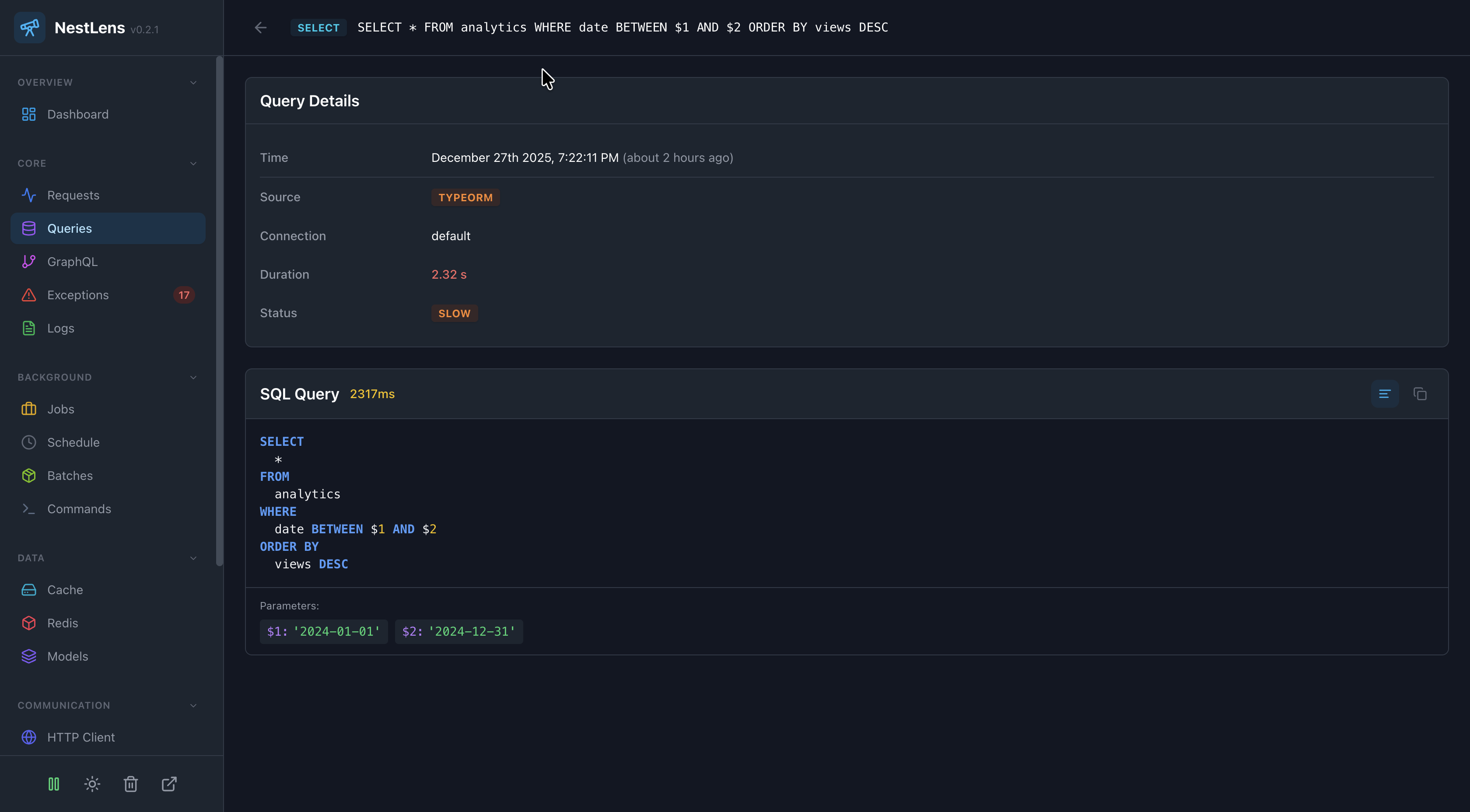
In the NestLens dashboard, query entries appear in the Queries tab showing:
- Timeline of all database queries
- Slow query indicators (red badge)
- Query execution time charts
- Most frequently executed queries
- Slowest queries
- Query details with parameters
- Correlation with HTTP requests
Filters Available
- Filter by slow queries only
- Filter by ORM source (TypeORM/Prisma)
- Filter by connection name
- Filter by minimum duration
- Search by query text
Performance Optimization
Use the Query Watcher to identify performance bottlenecks:
1. Find N+1 Query Problems
// BAD: N+1 query problem (visible in dashboard)
async getPostsWithAuthors() {
  const posts = await this.postRepository.find();
  // This causes N additional queries!
  for (const post of posts) {
    post.author = await this.userRepository.findOne(post.authorId);
  }
  return posts;
}

// GOOD: Single query with join
async getPostsWithAuthors() {
  return this.postRepository.find({
    relations: ['author'],
  });
}
2. Identify Missing Indexes
The dashboard shows which queries are consistently slow - these likely need indexes:
-- If this query is slow in the dashboard
SELECT * FROM users WHERE email = ?

-- Add an index
CREATE INDEX idx_users_email ON users(email);
3. Monitor Query Performance
Track query performance over time to catch regressions:
// Set a strict threshold for your app
NestLensModule.forRoot({
  watchers: {
    query: {
      slowThreshold: 10, // Very strict - anything over 10ms is flagged
    },
  },
})
TypeORM Multiple Connections
When using multiple TypeORM connections, queries are tagged with the connection name:
// app.module.ts
TypeOrmModule.forRoot({
  name: 'default',
  // ... config
}),
TypeOrmModule.forRoot({
  name: 'logging',
  // ... config
}),

// Queries will show connection: 'default' or connection: 'logging'
Prisma Query Format
Prisma queries are captured as operation names rather than raw SQL:
// Raw SQL
await prisma.$queryRaw`SELECT * FROM users WHERE email = ${email}`
// Captured as: Raw SQL query

// Prisma operations
await prisma.user.findMany({ where: { active: true } })
// Captured as: "User.findMany"

await prisma.user.create({ data: { name: 'John' } })
// Captured as: "User.create"
Related Watchers
- Request Watcher - See which requests triggered queries
- Model Watcher - Track ORM model operations with more detail
- Exception Watcher - Catch query-related errors