Request Watcher
The Request Watcher tracks all HTTP requests and responses in your NestJS application, capturing detailed information about endpoints, performance, and data flow.
What Gets Captured
- HTTP method (GET, POST, PUT, DELETE, etc.)
- Request URL, path, query parameters, and route params
- Request headers (with sensitive header masking)
- Request body (configurable)
- Response status code and headers
- Response body (configurable)
- Client IP address and user agent
- Controller and handler information
- User information (from request.user)
- Session data (from request.session)
- Custom tags
- Duration (milliseconds)
- Memory usage (bytes)
Configuration
NestLensModule.forRoot({
  watchers: {
    request: {
      enabled: true,
      ignorePaths: ['/health', '/metrics'],
      maxBodySize: 64 * 1024, // 64KB
      captureHeaders: true,
      captureBody: true,
      captureResponse: true,
      captureUser: true,
      captureSession: true,
      captureResponseHeaders: true,
      captureControllerInfo: true,
      tags: async (req) => {
        // Return custom tags for this request
        return ['api', req.method.toLowerCase()];
      },
    },
  },
})
Configuration Options
| Option | Type | Default | Description |
|---|---|---|---|
enabled | boolean | true | Enable/disable request tracking |
ignorePaths | string[] | [] | Paths to exclude from tracking |
maxBodySize | number | 64 * 1024 | Maximum body size to capture (bytes) |
captureHeaders | boolean | true | Capture request headers |
captureBody | boolean | true | Capture request body |
captureResponse | boolean | true | Capture response body |
captureUser | boolean | true | Capture authenticated user info |
captureSession | boolean | true | Capture session data |
captureResponseHeaders | boolean | true | Capture response headers |
captureControllerInfo | boolean | true | Capture controller/handler names |
captureMemory | boolean | false | Record heap growth across the handler |
tags | function | undefined | Function to generate custom tags |
:::note captureMemory is off by default
process.memoryUsage() walks V8's heap statistics, and two of those per request
came to about 2.5% of the process's CPU under load — for a figure that is one
global counter read either side of a handler sharing the heap with every other
request in flight. Measured on an endpoint returning {ok:true} it ranged from
-570 KB to +671 KB and came out negative once in thirty.
It is still worth having where a single request is being investigated in isolation, which is why the option exists. See Performance. :::
Payload Structure
interface RequestEntry {
  type: 'request';
  payload: {
    method: string;               // HTTP method
    url: string;                  // Full URL
    path: string;                 // Path only
    query: Record<string, unknown>;   // Query parameters
    params: Record<string, unknown>;  // Route parameters
    headers: Record<string, string>;
    body?: unknown;               // Request body
    ip?: string;                  // Client IP
    userAgent?: string;           // User agent
    statusCode: number;           // Response status (always present, defaults to 500 on error)
    responseBody?: unknown;       // Response body
    responseHeaders?: Record<string, string>;
    duration: number;             // Milliseconds (always present)
    memory?: number;              // Heap growth in bytes, only with captureMemory
    controllerAction?: string;    // e.g., "UserController.create"
    handler?: string;             // Handler method name
    user?: {                      // Authenticated user
      id: string | number;
      name?: string;
      email?: string;
    };
    session?: Record<string, unknown>;
    tags?: string[];              // Custom tags
  };
}
Usage Example
The Request Watcher automatically intercepts all HTTP requests. No manual instrumentation needed:
// Your controller - no changes needed
@Controller('users')
export class UserController {
  @Post()
  async create(@Body() data: CreateUserDto, @Req() request: Request) {
    // Request automatically tracked
    return this.userService.create(data);
  }

  @Get(':id')
  async findOne(@Param('id') id: string) {
    // All endpoints are tracked
    return this.userService.findOne(id);
  }
}
Adding Custom Tags
NestLensModule.forRoot({
  watchers: {
    request: {
      tags: async (req) => {
        const tags: string[] = [];

        // Add tags based on path
        if (req.path.startsWith('/api')) {
          tags.push('api');
        }

        // Add tags based on user
        if (req.user) {
          tags.push('authenticated');
          if (req.user.role === 'admin') {
            tags.push('admin');
          }
        }

        // Add tags based on method
        tags.push(req.method.toLowerCase());

        return tags;
      },
    },
  },
})
Ignoring Specific Paths
NestLensModule.forRoot({
  watchers: {
    request: {
      ignorePaths: [
        '/health',
        '/metrics',
        '/swagger',
        '/api/internal',
      ],
    },
  },
})
Dashboard View
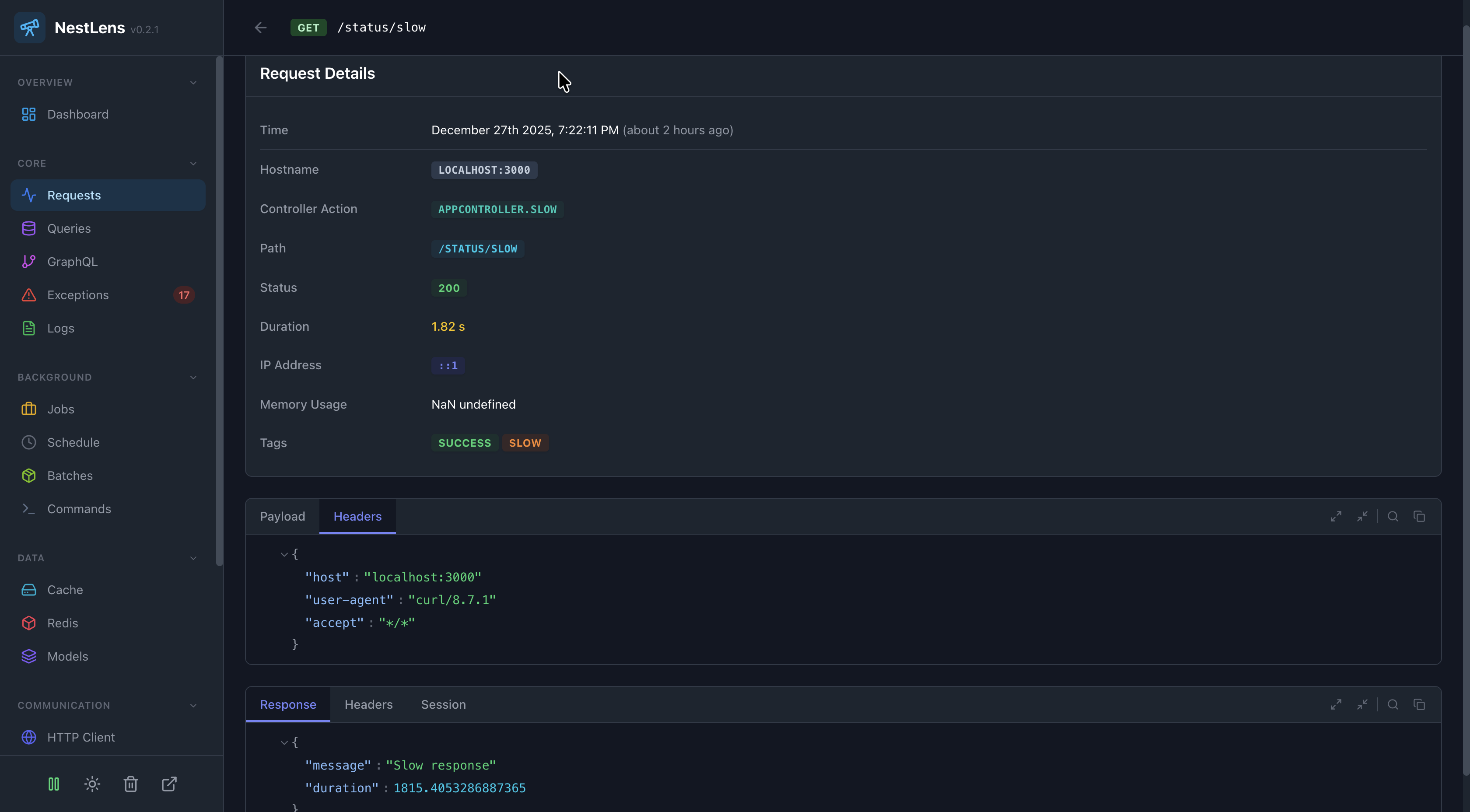
In the NestLens dashboard, request entries appear in the Requests tab showing:
- Timeline view of all requests
- Method badges (GET, POST, etc.)
- Status code badges (200, 404, 500, etc.)
- Response time charts
- Request/response inspection
- User information
- Correlated queries, logs, and exceptions
Filters Available
- Filter by HTTP method
- Filter by status code
- Filter by path pattern
- Filter by user
- Filter by tags
- Filter by response time
- Search by URL
Sensitive Data Handling
The Request Watcher automatically masks sensitive headers:
authorizationcookieset-cookiex-api-keyx-auth-token
Sensitive values are replaced with *** in the captured data.
Request Correlation
Each request is assigned a unique ID that propagates to all related entries:
// Access the request ID in your code
@Get()
async getData(@Req() req: NestLensRequest) {
  const requestId = req.nestlensRequestId;
  // Use for correlation with external systems
}
The request ID is also added to response headers as x-nestlens-request-id.
Related Watchers
- Exception Watcher - See exceptions that occurred during requests
- Query Watcher - See database queries executed during requests
- Log Watcher - See logs emitted during requests
- HTTP Client Watcher - See outgoing HTTP calls made during requests