Cache Watcher
The Cache Watcher tracks cache operations in your NestJS application, monitoring get, set, delete, and clear operations to help optimize cache usage and identify performance issues.
What Gets Captured
- Cache operation type (get, set, del, clear)
- Cache key
- Cache hit/miss status (for get operations)
- Cached value (truncated if large)
- TTL (time-to-live) for set operations
- Operation duration (milliseconds)
Configuration
import { CacheModule } from '@nestjs/cache-manager';

NestLensModule.forRoot({
  watchers: {
    cache: {
      enabled: true,
    },
  },
})
Configuration Options
| Option | Type | Default | Description |
|---|---|---|---|
enabled | boolean | false | Enable/disable cache tracking |
Payload Structure
interface CacheEntry {
  type: 'cache';
  payload: {
    operation: 'get' | 'set' | 'del' | 'clear';
    key: string;              // Cache key
    hit?: boolean;            // true if cache hit, false if miss (get only)
    value?: unknown;          // Cached value (truncated to 1KB)
    ttl?: number;             // Time-to-live in seconds (set only)
    duration: number;         // Operation duration (ms)
  };
}
Usage Example
Setup Cache Module
import { Module } from '@nestjs/common';
import { CacheModule } from '@nestjs/cache-manager';

@Module({
  imports: [
    // Install: npm install @nestjs/cache-manager cache-manager
    CacheModule.register({
      ttl: 60, // seconds
      max: 100, // maximum number of items
    }),
  ],
})
export class AppModule {}
Using Cache in Services
import { Injectable, Inject } from '@nestjs/common';
import { CACHE_MANAGER } from '@nestjs/cache-manager';
import { Cache } from 'cache-manager';

@Injectable()
export class UserService {
  constructor(
    @Inject(CACHE_MANAGER)
    private cacheManager: Cache,
  ) {}

  async findOne(id: string) {
    // Check cache first (tracked as 'get' operation)
    const cached = await this.cacheManager.get(`user:${id}`);
    if (cached) {
      return cached; // Cache hit
    }

    // Fetch from database
    const user = await this.userRepository.findOne({ where: { id } });

    // Store in cache (tracked as 'set' operation)
    await this.cacheManager.set(`user:${id}`, user, 300); // 5 minutes

    return user;
  }

  async update(id: string, data: UpdateUserDto) {
    const user = await this.userRepository.update(id, data);

    // Invalidate cache (tracked as 'del' operation)
    await this.cacheManager.del(`user:${id}`);

    return user;
  }

  async clearAll() {
    // Clear all cache (tracked as 'clear' operation)
    await this.cacheManager.reset();
  }
}
Cache Interceptor
import { CacheInterceptor, CacheKey, CacheTTL } from '@nestjs/cache-manager';

@Controller('users')
@UseInterceptors(CacheInterceptor)
export class UserController {
  @Get()
  @CacheKey('all-users')
  @CacheTTL(60) // 60 seconds
  async findAll() {
    // Response is automatically cached
    // All cache operations are tracked
    return this.userService.findAll();
  }

  @Get(':id')
  async findOne(@Param('id') id: string) {
    return this.userService.findOne(id);
  }
}
Custom Cache Keys
@Injectable()
export class ProductService {
  async getProductsByCategory(category: string, page: number) {
    const cacheKey = `products:${category}:page:${page}`;

    // Check cache
    const cached = await this.cacheManager.get(cacheKey);
    if (cached) return cached;

    // Fetch and cache
    const products = await this.fetchProducts(category, page);
    await this.cacheManager.set(cacheKey, products, 600);

    return products;
  }
}
Dashboard View
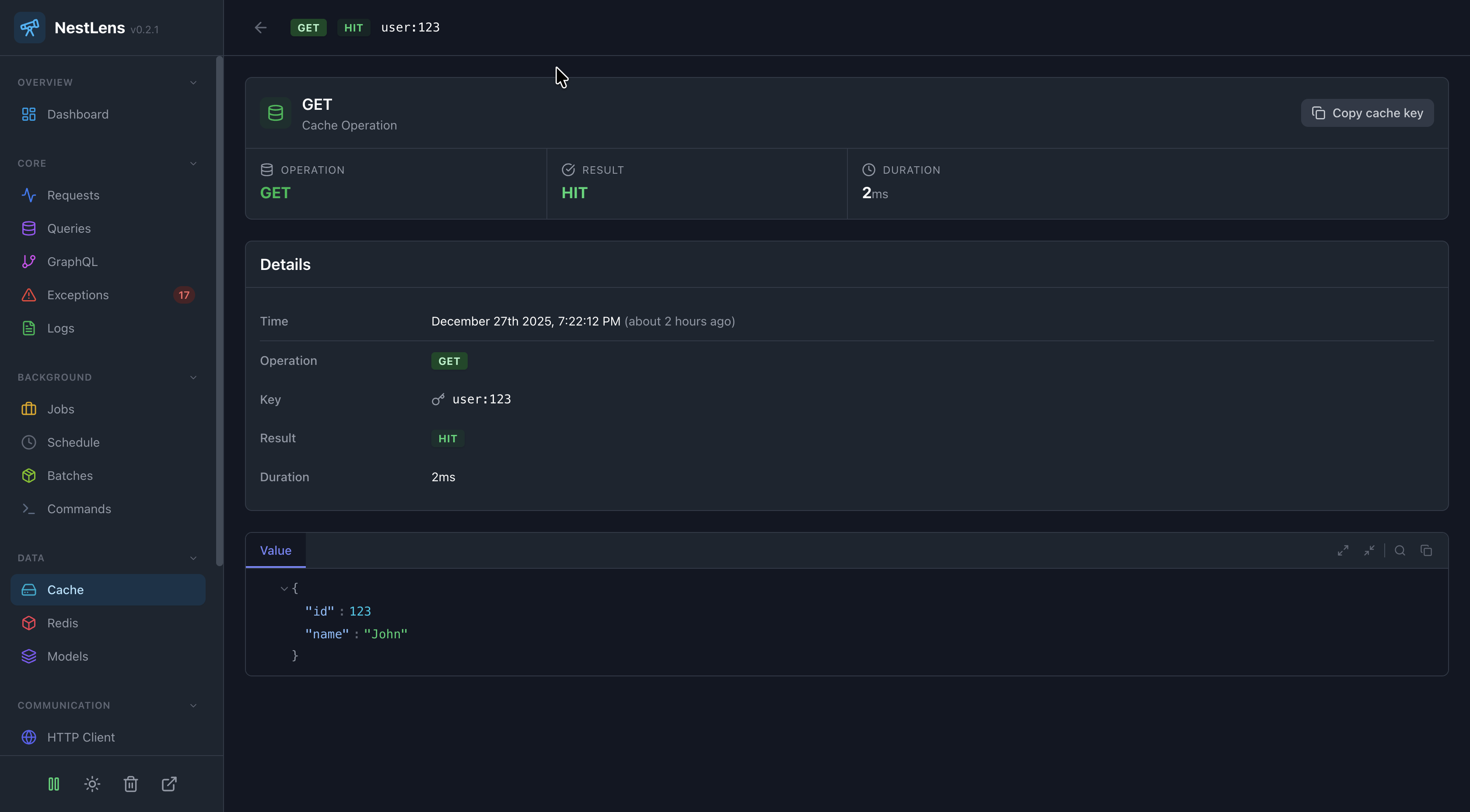
In the NestLens dashboard, cache entries appear in the Cache tab showing:
- Timeline of cache operations
- Operation type badges (GET, SET, DEL, CLEAR)
- Cache hit/miss ratio
- Most accessed keys
- Cache performance metrics
- Key patterns analysis
- TTL distribution
Filters Available
- Filter by operation type
- Filter by cache hit/miss
- Filter by key pattern
- Search by key name
- Filter by duration
Cache Performance Analysis
1. Hit Ratio
Monitor cache effectiveness:
// Dashboard shows:
// - Total gets: 1000
// - Cache hits: 850
// - Cache misses: 150
// - Hit ratio: 85%

// If hit ratio is low, consider:
// - Increasing TTL
// - Increasing cache size
// - Better cache key strategy
2. Most Accessed Keys
Identify hot keys:
// Dashboard shows most accessed keys:
// - user:123 (500 accesses)
// - products:electronics (300 accesses)
// - settings:app (200 accesses)

// Consider:
// - Longer TTL for hot keys
// - Pre-warming cache for these keys
3. Cache Efficiency
// Monitor operation durations
// - Average get: 2ms (fast!)
// - Average set: 5ms
// - Slow operations indicate issues

// If operations are slow:
// - Check cache storage backend
// - Consider Redis instead of memory
// - Optimize value sizes
Cache Strategies
1. Cache-Aside Pattern
async getData(key: string) {
  // Try cache first
  let data = await this.cacheManager.get(key);

  if (!data) {
    // Cache miss - fetch from source
    data = await this.fetchFromDatabase(key);
    // Store in cache
    await this.cacheManager.set(key, data, 300);
  }

  return data;
}
2. Write-Through Pattern
async updateData(key: string, value: any) {
  // Update database
  await this.database.update(key, value);

  // Update cache immediately
  await this.cacheManager.set(key, value, 300);
}
3. Cache Invalidation
async invalidateUser(userId: string) {
  // Invalidate all related cache keys
  await this.cacheManager.del(`user:${userId}`);
  await this.cacheManager.del(`user:${userId}:posts`);
  await this.cacheManager.del(`user:${userId}:settings`);
}
Cache Backends
Memory Store (Default)
CacheModule.register({
  ttl: 60,
  max: 100,
})
Redis Store
import { redisStore } from 'cache-manager-redis-yet';

CacheModule.register({
  store: redisStore,
  host: 'localhost',
  port: 6379,
  ttl: 60,
})
All backends are automatically tracked by the Cache Watcher.
Value Truncation
Large cached values are truncated to prevent storage bloat:
// Values larger than 1KB are truncated
const largeValue = { /* ... very large object ... */ };
await this.cacheManager.set('key', largeValue);

// In dashboard, you'll see:
// value: { _truncated: true, _size: 15360 }
Cache Key Patterns
Use consistent naming patterns:
// GOOD: Hierarchical patterns
await this.cacheManager.set('user:123', user);
await this.cacheManager.set('user:123:posts', posts);
await this.cacheManager.set('product:electronics:featured', products);

// BAD: Inconsistent patterns
await this.cacheManager.set('user123', user);
await this.cacheManager.set('posts_for_user_123', posts);
await this.cacheManager.set('featuredElectronics', products);
TTL Strategy
@Injectable()
export class CacheService {
  // Static data: Long TTL
  async getStaticContent() {
    return this.cacheManager.set('static:content', data, 3600); // 1 hour
  }

  // User data: Medium TTL
  async getUserData(id: string) {
    return this.cacheManager.set(`user:${id}`, data, 300); // 5 minutes
  }

  // Real-time data: Short TTL
  async getRealTimeData() {
    return this.cacheManager.set('realtime:data', data, 10); // 10 seconds
  }
}
Related Watchers
- Request Watcher - See cache operations per request
- Query Watcher - Compare cache vs database performance
- Redis Watcher - Track Redis-specific operations