Exception Watcher
The Exception Watcher captures unhandled exceptions and errors in your NestJS application, providing detailed stack traces and context for debugging.
What Gets Captured
- Exception name (class name)
- Error message
- Stack trace
- HTTP status code (for HTTP exceptions)
- Exception context (HTTP, RPC, WebSocket)
- Request information (method, URL, body)
- Request correlation ID
:::info Where GraphQL exceptions come from
This watcher is an HTTP exception filter: it records what a controller threw.
A resolver that throws is handled by the GraphQL server, never reaches it, and
is recorded by the GraphQL watcher instead — which writes both the
operation and an exception entry for what the resolver threw, sharing one
request id. So stats, the Exceptions page, sampling.always: ['exception']
and an alerting webhook on events: ['exception'] all work on a GraphQL API,
provided watchers.graphql is enabled.
Two things are deliberately not recorded as exceptions: a document that does
not parse and a field the schema does not have. Nobody threw — the caller made
the mistake — and since an alerting webhook defaults to events: ['exception'],
recording them would let anyone with curl page whoever is on call. They are on
the operation entry with its 400.
watchers.graphql.recordExceptions: false turns this off; the errors stay on
the operation entry.
:::
Configuration
NestLensModule.forRoot({
  watchers: {
    exception: {
      enabled: true,
      ignoreExceptions: [
        'NotFoundException',
        'UnauthorizedException',
      ],
    },
  },
})
Configuration Options
| Option | Type | Default | Description |
|---|---|---|---|
enabled | boolean | true | Enable/disable exception tracking |
ignoreExceptions | string[] | [] | Exception class names to ignore |
Payload Structure
interface ExceptionEntry {
  type: 'exception';
  payload: {
    name: string;                 // Exception class name
    message: string;              // Error message
    stack?: string;               // Stack trace
    code?: string | number;       // HTTP status or error code
    context: string;              // 'HTTP', 'RPC', 'WebSocket', or raw type
    request: {                    // Request info (always present in HTTP context)
      method: string;
      url: string;
      body?: unknown;
    };
  };
}
Usage Example
The Exception Watcher automatically captures all unhandled exceptions:
@Controller('users')
export class UserController {
  @Get(':id')
  async findOne(@Param('id') id: string) {
    const user = await this.userService.findOne(id);

    if (!user) {
      // This exception will be captured automatically
      throw new NotFoundException(`User ${id} not found`);
    }

    return user;
  }

  @Post()
  async create(@Body() data: CreateUserDto) {
    try {
      return await this.userService.create(data);
    } catch (error) {
      // Custom exceptions are also captured
      throw new BadRequestException('Failed to create user');
    }
  }
}
Custom Exceptions
// Custom exception class
export class BusinessRuleException extends HttpException {
  constructor(message: string) {
    super(message, HttpStatus.UNPROCESSABLE_ENTITY);
  }
}

// Will be captured with name: 'BusinessRuleException'
@Post('validate')
async validate(@Body() data: any) {
  if (!this.isValid(data)) {
    throw new BusinessRuleException('Data validation failed');
  }
}
Ignoring Expected Exceptions
Some exceptions are expected and don't need tracking:
NestLensModule.forRoot({
  watchers: {
    exception: {
      ignoreExceptions: [
        'NotFoundException',        // 404 errors
        'UnauthorizedException',    // 401 errors
        'ForbiddenException',       // 403 errors
      ],
    },
  },
})
Dashboard View
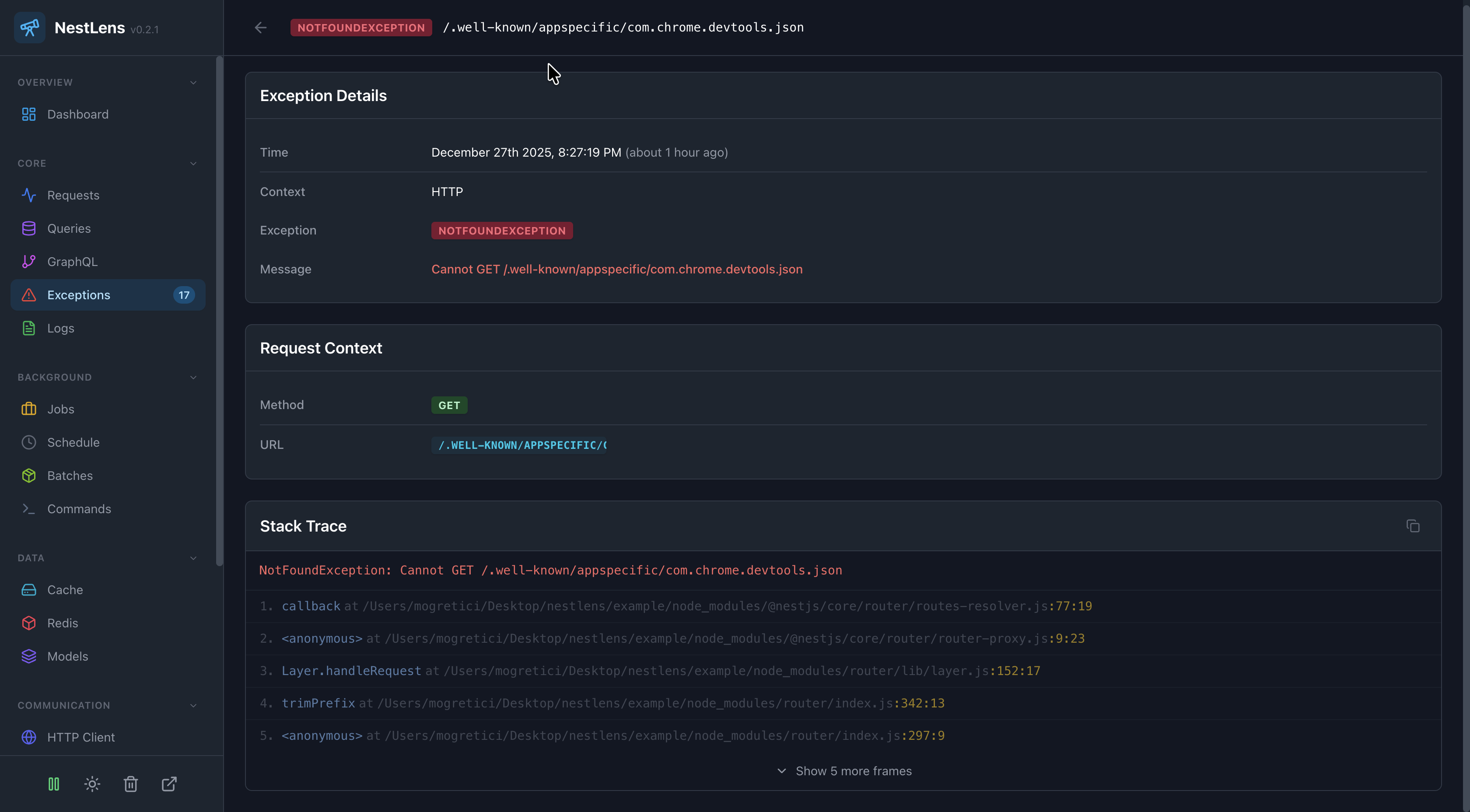
In the NestLens dashboard, exception entries appear in the Exceptions tab showing:
- Timeline of all exceptions
- Exception type badges
- Stack trace viewer
- Request context
- Frequency charts (most common exceptions)
- Error rate trends
- Correlation with requests
Filters Available
- Filter by exception type/name
- Filter by HTTP status code
- Filter by context (HTTP, RPC, WS)
- Search by error message
- Filter by time range
Exception Analysis
1. Find Most Common Errors
The dashboard shows which exceptions occur most frequently:
// If you see "ValidationException" occurring frequently:
// - Check input validation rules
// - Add better client-side validation
// - Improve error messages
2. Debug with Stack Traces
Each exception includes a full stack trace:
Error: User not found
    at UserService.findOne (user.service.ts:45:13)
    at UserController.getUser (user.controller.ts:23:32)
    at ...
3. Correlate with Requests
Click on an exception to see:
- The HTTP request that caused it
- Query parameters and body
- Related database queries
- User who triggered the error
Exception Handling Best Practices
1. Use Specific Exception Types
// GOOD: Specific exception types
if (!user) {
  throw new NotFoundException('User not found');
}

if (!canAccess) {
  throw new ForbiddenException('Insufficient permissions');
}

// BAD: Generic errors
if (!user) {
  throw new Error('Something went wrong');
}
2. Include Context in Messages
// GOOD: Descriptive message
throw new NotFoundException(
  `User with ID ${id} not found in organization ${orgId}`
);

// BAD: Vague message
throw new NotFoundException('Not found');
3. Handle Expected Errors
@Post('upload')
async upload(@UploadedFile() file: Express.Multer.File) {
  try {
    return await this.processFile(file);
  } catch (error) {
    // Log but don't throw for expected errors
    if (error instanceof UnsupportedFileTypeError) {
      throw new BadRequestException(
        `File type ${file.mimetype} not supported`
      );
    }
    // Re-throw unexpected errors to be captured
    throw error;
  }
}
Exception Filters Integration
NestLens works with custom exception filters:
@Catch(HttpException)
export class HttpExceptionFilter implements ExceptionFilter {
  catch(exception: HttpException, host: ArgumentsHost) {
    // Your custom exception handling
    const ctx = host.switchToHttp();
    const response = ctx.getResponse();
    const status = exception.getStatus();

    // Exception will still be captured by NestLens
    response.status(status).json({
      statusCode: status,
      message: exception.message,
      timestamp: new Date().toISOString(),
    });
  }
}

// Register the filter
app.useGlobalFilters(new HttpExceptionFilter());
Error Monitoring Alerts
Use the Exception Watcher data to set up monitoring:
// Example: Check for error rate spike
const recentExceptions = await getExceptions({
  since: Date.now() - 5 * 60 * 1000, // Last 5 minutes
});

if (recentExceptions.length > 100) {
  // Alert: High error rate!
  await sendAlert('High exception rate detected');
}
Context Types
Exceptions can occur in different contexts:
- HTTP - From HTTP request handlers
- RPC - From microservice RPC calls
- WebSocket - From WebSocket event handlers
Each context provides different metadata in the captured exception.
Immediate Collection
Exception entries are collected immediately (not batched) because they're critical for debugging. This ensures exceptions are saved even if the application crashes shortly after.
Related Watchers
- Request Watcher - See the full request that caused the exception
- Query Watcher - See if a database query caused the error
- Log Watcher - See logs leading up to the exception