Job Watcher
The Job Watcher monitors Bull and BullMQ job queue processing, tracking job lifecycle, failures, and performance metrics.
What Gets Captured
- Job name
- Queue name
- Job status (waiting, active, completed, failed, delayed)
- Job data/payload
- Number of attempts
- Processing duration
- Result or error message
Configuration
NestLensModule.forRoot({
  watchers: {
    job: {
      enabled: true,
    },
  },
})
Configuration Options
| Option | Type | Default | Description |
|---|---|---|---|
enabled | boolean | false | Enable/disable job tracking |
Payload Structure
interface JobEntry {
  type: 'job';
  payload: {
    name: string;               // Job name
    queue: string;              // Queue name
    data: unknown;              // Job data (required, truncated to 64KB)
    status: 'waiting' | 'active' | 'completed' | 'failed' | 'delayed';
    attempts: number;           // Number of attempts
    duration?: number;          // Processing time (ms)
    error?: string;             // Error message if failed
    result?: unknown;           // Job result
  };
}
Usage Example
Setup Bull Queue
// Install: npm install @nestjs/bull bull
import { BullModule } from '@nestjs/bull';

@Module({
  imports: [
    BullModule.forRoot({
      redis: {
        host: 'localhost',
        port: 6379,
      },
    }),
    BullModule.registerQueue({
      name: 'email',
    }),
  ],
})
export class AppModule {}
Register Queue with NestLens
import { Injectable, OnModuleInit } from '@nestjs/common';
import { InjectQueue } from '@nestjs/bull';
import { Queue } from 'bull';
import { JobWatcher } from 'nestlens';

@Injectable()
export class EmailModule implements OnModuleInit {
  constructor(
    @InjectQueue('email') private emailQueue: Queue,
    private jobWatcher: JobWatcher,
  ) {}

  onModuleInit() {
    // Setup tracking for this queue
    this.jobWatcher.setupQueue(this.emailQueue, 'email');
  }
}
Register a BullMQ Queue with NestLens
BullMQ emits job lifecycle events through a separate QueueEvents instance rather than on the Queue itself. The Job Watcher exposes dedicated methods for this.
Simplified API: setupBullMQQueue()
setupBullMQQueue(queue, queueName?) is the easiest option — it automatically creates a QueueEvents instance using the queue's Redis connection and wires up tracking for you:
import { Injectable, OnModuleInit, OnModuleDestroy } from '@nestjs/common';
import { InjectQueue } from '@nestjs/bullmq';
import { Queue } from 'bullmq';
import { JobWatcher } from 'nestlens';

@Injectable()
export class EmailModule implements OnModuleInit, OnModuleDestroy {
  constructor(
    @InjectQueue('email') private emailQueue: Queue,
    private jobWatcher: JobWatcher,
  ) {}

  async onModuleInit() {
    // Automatically creates and manages a QueueEvents instance
    await this.jobWatcher.setupBullMQQueue(this.emailQueue, 'email');
  }

  async onModuleDestroy() {
    // Clean up the QueueEvents instances created by setupBullMQQueue
    await this.jobWatcher.closeQueueEvents();
  }
}
closeQueueEvents() closes every QueueEvents instance that setupBullMQQueue() created. Call it in onModuleDestroy to release the Redis connections cleanly.
Manual API: setupQueueWithEvents()
If you already manage your own QueueEvents lifecycle, use setupQueueWithEvents(queue, queueEvents, queueName?) instead. The watcher will not create or close the QueueEvents instance — you remain responsible for it:
import { Injectable, OnModuleInit } from '@nestjs/common';
import { InjectQueue } from '@nestjs/bullmq';
import { Queue, QueueEvents } from 'bullmq';
import { JobWatcher } from 'nestlens';

@Injectable()
export class EmailModule implements OnModuleInit {
  private readonly queueEvents = new QueueEvents('email', {
    connection: { host: 'localhost', port: 6379 },
  });

  constructor(
    @InjectQueue('email') private emailQueue: Queue,
    private jobWatcher: JobWatcher,
  ) {}

  onModuleInit() {
    this.jobWatcher.setupQueueWithEvents(this.emailQueue, this.queueEvents, 'email');
  }
}
Adding Jobs
@Injectable()
export class UserService {
  constructor(@InjectQueue('email') private emailQueue: Queue) {}

  async register(data: RegisterDto) {
    const user = await this.userRepository.save(data);

    // Add job to queue (automatically tracked)
    await this.emailQueue.add('welcome-email', {
      userId: user.id,
      email: user.email,
    });

    return user;
  }
}
Processing Jobs
import { Processor, Process } from '@nestjs/bull';
import { Job } from 'bull';

@Processor('email')
export class EmailProcessor {
  @Process('welcome-email')
  async sendWelcomeEmail(job: Job) {
    // Job processing is tracked automatically
    const { userId, email } = job.data;

    await this.emailService.send({
      to: email,
      subject: 'Welcome!',
      template: 'welcome',
    });

    return { sent: true };
  }

  @Process('password-reset')
  async sendPasswordReset(job: Job) {
    const { userId, token } = job.data;
    await this.emailService.sendPasswordReset(userId, token);
  }
}
Dashboard View
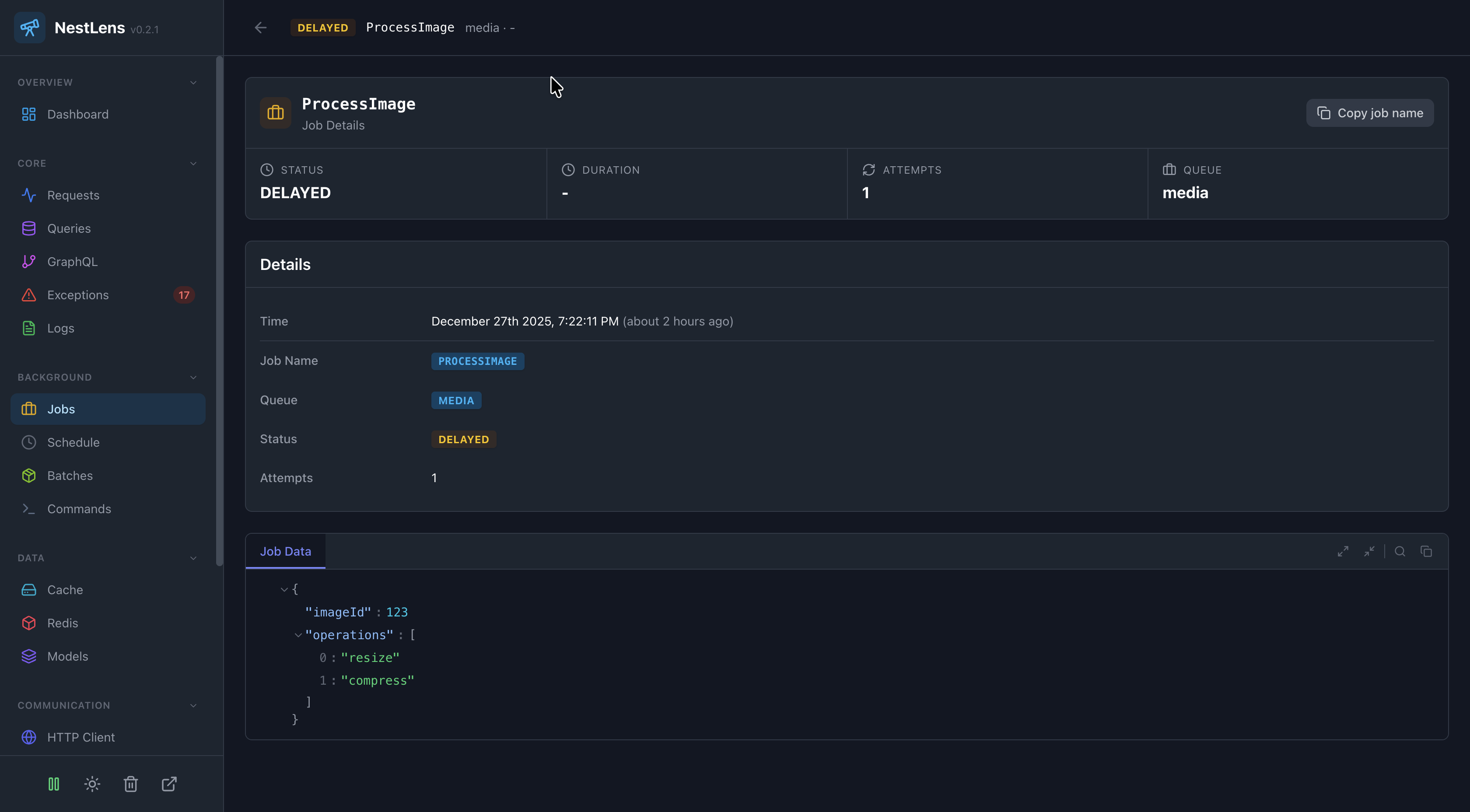
In the NestLens dashboard, job entries show:
- Job queue activity timeline
- Job status distribution
- Failed jobs with error messages
- Retry attempts
- Processing duration per job type
- Queue performance metrics
Job Retry Handling
@Process('payment-processing')
async processPayment(job: Job) {
  try {
    await this.paymentGateway.charge(job.data);
    return { success: true };
  } catch (error) {
    // Job will be marked as failed and tracked
    // Bull will automatically retry based on configuration
    throw error;
  }
}
Related Watchers
- Event Watcher - Track events that trigger jobs
- Request Watcher - See which requests queued jobs