Log Watcher
The Log Watcher collects application logs emitted through NestJS's built-in logger, providing a centralized view of all log messages with context and correlation.
What Gets Captured
- Log level (verbose, debug, log, warn, error)
- Log message
- Context (logger name/category)
- Stack trace (for errors)
- Request correlation ID
Configuration
NestLensModule.forRoot({
  watchers: {
    log: {
      enabled: true,
      minLevel: 'log', // 'verbose', 'debug', 'log', 'warn', 'error'
    },
  },
})
Configuration Options
| Option | Type | Default | Description |
|---|---|---|---|
enabled | boolean | true | Enable/disable log tracking |
minLevel | string | 'log' | Minimum log level to capture |
Payload Structure
interface LogEntry {
  type: 'log';
  payload: {
    level: 'debug' | 'log' | 'warn' | 'error' | 'verbose';
    message: string;            // Log message
    context?: string;           // Logger context/name
    stack?: string;             // Stack trace (for errors)
    metadata?: Record<string, unknown>; // Additional metadata
  };
}
Usage Example
Using NestLens Logger
Replace NestJS's default logger with NestLens logger:
// main.ts
import { NestFactory } from '@nestjs/core';
import { AppModule } from './app.module';
import { NestLensLogger } from 'nestlens';

async function bootstrap() {
  const app = await NestFactory.create(AppModule, {
    logger: false, // Disable default logger
  });

  // Use NestLens logger
  app.useLogger(app.get(NestLensLogger));

  await app.listen(3000);
}
bootstrap();
Logging in Services
import { Injectable, Logger } from '@nestjs/common';

@Injectable()
export class UserService {
  private readonly logger = new Logger(UserService.name);

  async create(data: CreateUserDto) {
    this.logger.log('Creating new user');
    this.logger.debug(`User data: ${JSON.stringify(data)}`);

    try {
      const user = await this.userRepository.save(data);
      this.logger.log(`User created with ID: ${user.id}`);
      return user;
    } catch (error) {
      this.logger.error('Failed to create user', error.stack);
      throw error;
    }
  }

  async findOne(id: string) {
    this.logger.verbose(`Finding user ${id}`);
    const user = await this.userRepository.findOne({ where: { id } });

    if (!user) {
      this.logger.warn(`User ${id} not found`);
      return null;
    }

    return user;
  }
}
Log Levels
// Verbose: Detailed diagnostic information
this.logger.verbose('User query cache hit');

// Debug: Debugging information
this.logger.debug(`Processing ${items.length} items`);

// Log: General informational messages
this.logger.log('Application started successfully');

// Warn: Warning messages
this.logger.warn('Database connection slow (500ms)');

// Error: Error messages with optional stack trace
this.logger.error('Failed to process payment', error.stack);
Setting Minimum Log Level
// Development: Capture everything
NestLensModule.forRoot({
  watchers: {
    log: {
      minLevel: 'debug',
    },
  },
})

// Production: Only important logs
NestLensModule.forRoot({
  watchers: {
    log: {
      minLevel: 'warn', // Only warnings and errors
    },
  },
})
Dashboard View
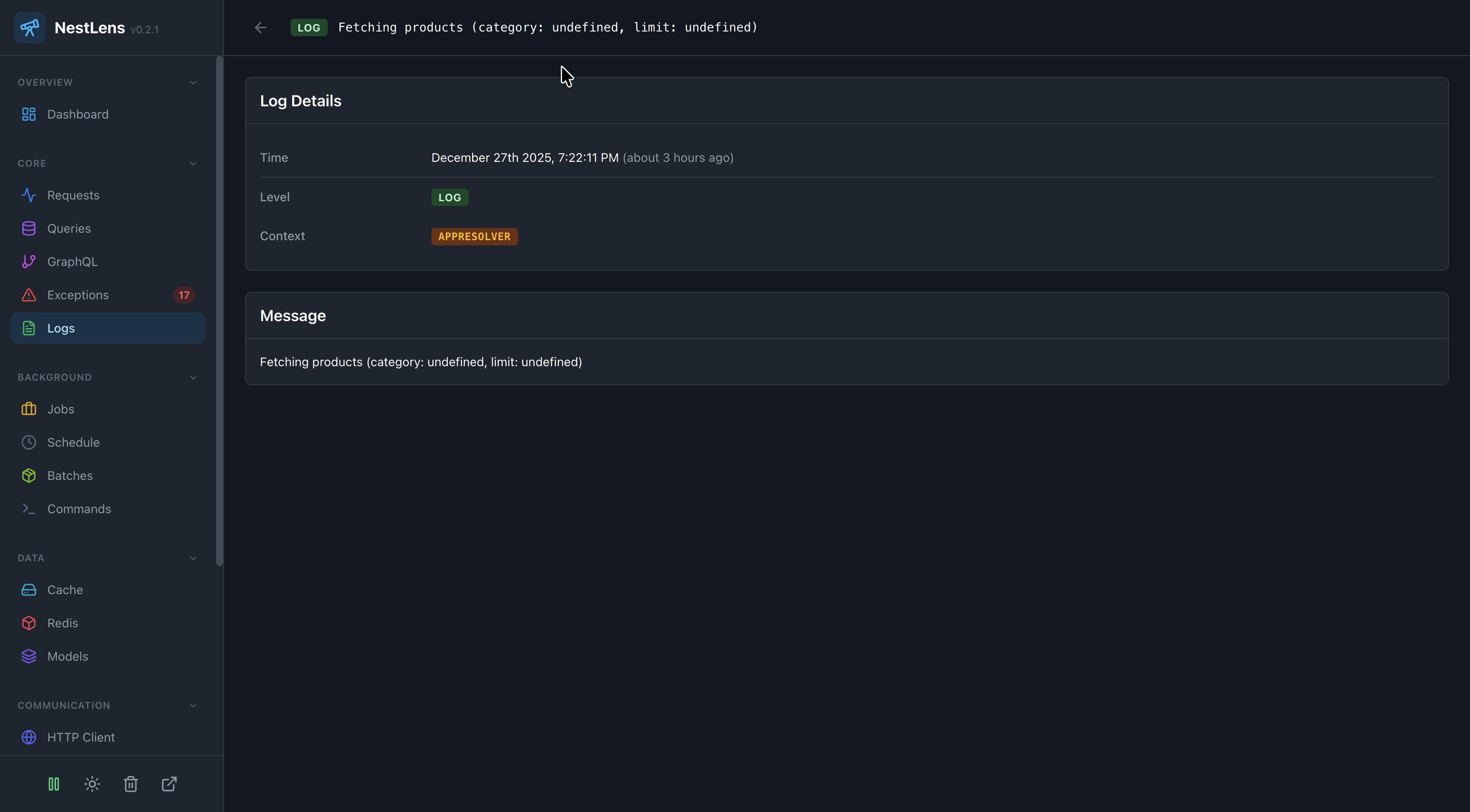
In the NestLens dashboard, log entries appear in the Logs tab showing:
- Timeline of all logs
- Log level badges (colored by severity)
- Context/logger names
- Log message search
- Frequency charts by level
- Logs correlated with requests
- Stack trace viewer (for errors)
Filters Available
- Filter by log level
- Filter by context/logger name
- Filter by time range
- Search by message content
- Show only logs with stack traces
Log Contexts
Organize logs by context:
@Injectable()
export class AuthService {
  private readonly logger = new Logger('AuthService');
  // All logs will have context: 'AuthService'

  async login(credentials: LoginDto) {
    this.logger.log('User login attempt');
    // Shows: [AuthService] User login attempt
  }
}

@Injectable()
export class PaymentService {
  private readonly logger = new Logger('PaymentService');
  // All logs will have context: 'PaymentService'

  async processPayment(amount: number) {
    this.logger.log(`Processing payment: $${amount}`);
    // Shows: [PaymentService] Processing payment: $100
  }
}
Request Correlation
Logs automatically correlate with the current HTTP request:
@Get(':id')
async findOne(@Param('id') id: string) {
  this.logger.log(`Fetching user ${id}`);
  // This log is linked to the current request

  const user = await this.userService.findOne(id);
  // Logs in findOne() are also linked to this request

  return user;
}
In the dashboard, click on a request to see all related logs.
Structured Logging
Use structured log messages for better searchability:
// GOOD: Structured
this.logger.log(`User ${userId} updated profile field: ${field}`);

// BETTER: Include identifiers
this.logger.log(
  `User ${userId} updated profile`,
  JSON.stringify({ field, oldValue, newValue })
);

// BAD: Vague
this.logger.log('Profile updated');
Performance Considerations
1. Avoid Excessive Debug Logs
// BAD: Logging in tight loops
for (const item of items) {
  this.logger.debug(`Processing item ${item.id}`); // Too many logs!
}

// GOOD: Aggregate logging
this.logger.debug(`Processing ${items.length} items`);
items.forEach(item => this.process(item));
this.logger.debug('Processing complete');
2. Use Appropriate Log Levels
// Development
this.logger.debug(`Cache key: ${key}`);

// Production (won't be captured if minLevel is 'log')
NestLensModule.forRoot({
  watchers: {
    log: {
      minLevel: 'log', // debug logs are ignored
    },
  },
})
3. Conditional Logging
if (process.env.NODE_ENV === 'development') {
  this.logger.debug(`Detailed debug info: ${JSON.stringify(data)}`);
}
Log Filtering
NestLens automatically filters out its own internal logs to avoid recursion:
// These won't be captured to avoid infinite loops
this.logger.log('NestLens started'); // Context includes 'NestLens'
this.logger.log('Collector processed entries'); // Context is 'Collector'
Error Logging Best Practices
try {
  await this.riskyOperation();
} catch (error) {
  // GOOD: Include stack trace
  this.logger.error(
    `Operation failed: ${error.message}`,
    error.stack,
    'OperationContext'
  );

  // BAD: No stack trace
  this.logger.error(`Operation failed: ${error.message}`);
}
Integration with External Loggers
NestLens logger extends NestJS's ConsoleLogger, so it works with all existing logging code:
// winston, pino, or any other logger
import { WinstonModule } from 'nest-winston';

// You can use both!
const app = await NestFactory.create(AppModule, {
  logger: WinstonModule.createLogger(winstonConfig),
});

// And also use NestLens for centralized dashboard viewing
app.useLogger(app.get(NestLensLogger));
Related Watchers
- Request Watcher - See logs related to specific requests
- Exception Watcher - See error logs with stack traces
- Query Watcher - Cross-reference logs with database queries