Schedule Watcher
The Schedule Watcher monitors scheduled tasks in your NestJS application — @Cron, @Interval and @Timeout alike — tracking execution, failures, and timing information.
What Gets Captured
- Scheduled task name
- Cron pattern (if applicable)
- Execution status (started, completed, failed)
- Processing duration
- Error messages
- Next run time
Configuration
NestLensModule.forRoot({
  watchers: {
    schedule: {
      enabled: true,
    },
  },
})
Configuration Options
| Option | Type | Default | Description |
|---|---|---|---|
enabled | boolean | false | Enable/disable schedule tracking |
Payload Structure
interface ScheduleEntry {
  type: 'schedule';
  payload: {
    name: string;               // Task name
    cron?: string;              // Cron pattern (for @Cron)
    interval?: number;          // Interval in ms (for @Interval)
    timeout?: number;           // Delay in ms (for @Timeout)
    status: 'started' | 'completed' | 'failed';
    duration?: number;          // Execution time (ms)
    error?: string;             // Error message if failed
    nextRun?: string;           // Next scheduled run (ISO string)
  };
}
Requirements
The Schedule Watcher relies on @nestjs/schedule to discover your scheduled tasks. To enable tracking:
-
Install
@nestjs/schedule— it is an optional peer dependency:npm install @nestjs/schedule -
Import
ScheduleModule.forRoot()in yourAppModule.
When both are in place, the watcher discovers @nestjs/schedule's own services through NestJS DiscoveryService and follows every scheduled task. You do not need to provide any token, registry, or instance manually.
:::note How a failed task appears
@nestjs/schedule wraps every decorated method in its own try/catch and logs the error itself, so nothing downstream can tell a failed run of a @Cron, @Interval or @Timeout method from a successful one — the schedule entry says completed, and the failure appears as a log entry instead, which the Log Watcher records.
A cron job you register yourself with SchedulerRegistry.addCronJob() is not wrapped that way, and its failures are recorded as failed with the error message.
:::
If @nestjs/schedule is not installed or ScheduleModule.forRoot() is not imported, the watcher quietly stays inactive.
Usage Example
Setup Schedule Module
// Install: npm install @nestjs/schedule
import { ScheduleModule } from '@nestjs/schedule';

@Module({
  imports: [ScheduleModule.forRoot()],
})
export class AppModule {}
Cron Jobs
import { Injectable } from '@nestjs/common';
import { Cron, CronExpression } from '@nestjs/schedule';

@Injectable()
export class TasksService {
  // Run every day at midnight
  @Cron('0 0 * * *', { name: 'daily-cleanup' })
  async handleDailyCleanup() {
    // Automatically tracked
    console.log('Running daily cleanup');
    await this.cleanupOldRecords();
  }

  // Run every 5 minutes
  @Cron(CronExpression.EVERY_5_MINUTES, { name: 'sync-data' })
  async handleDataSync() {
    console.log('Syncing data');
    await this.syncExternalData();
  }

  // Run every hour
  @Cron(CronExpression.EVERY_HOUR, { name: 'send-reports' })
  async sendHourlyReports() {
    console.log('Sending reports');
    await this.reportService.sendReports();
  }
}
Intervals
import { Interval } from '@nestjs/schedule';

@Injectable()
export class MonitoringService {
  @Interval('health-check', 10000) // Every 10 seconds
  handleHealthCheck() {
    console.log('Performing health check');
    this.checkSystemHealth();
  }
}
Timeouts
import { Timeout } from '@nestjs/schedule';

@Injectable()
export class StartupService {
  @Timeout('warmup-cache', 5000) // Run once after 5 seconds
  handleCacheWarmup() {
    console.log('Warming up cache');
    this.warmupCache();
  }
}
Dashboard View
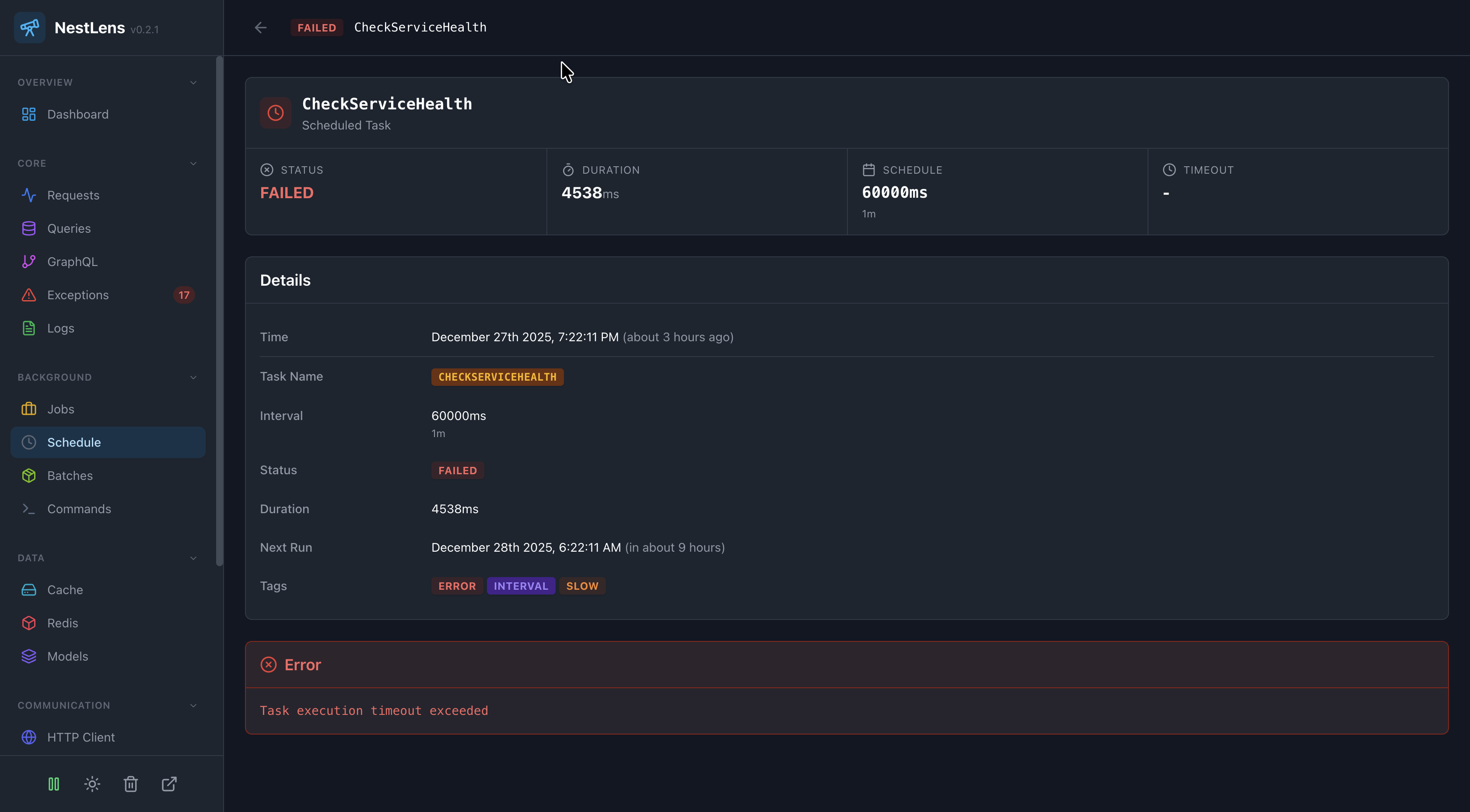
In the NestLens dashboard, schedule entries show:
- Timeline of scheduled task executions
- Task execution frequency
- Failed tasks with error messages
- Average execution duration per task
- Next scheduled runs
- Cron pattern visualization
Cron Patterns
Common cron patterns tracked by the watcher:
// Every minute
@Cron('* * * * *')

// Every hour at minute 0
@Cron('0 * * * *')

// Every day at 2:30 AM
@Cron('30 2 * * *')

// Every Monday at 9 AM
@Cron('0 9 * * 1')

// First day of every month at midnight
@Cron('0 0 1 * *')
Error Handling
@Cron('0 * * * *', { name: 'data-import' })
async handleDataImport() {
  try {
    await this.importData();
  } catch (error) {
    // Error is tracked automatically
    console.error('Data import failed:', error);
    // Send alert
    await this.alertService.notify('Data import failed');
  }
}
Limitations
Currently, the Schedule Watcher has the following limitations:
- Cron jobs: Fully tracked with execution times and status
- Intervals: Registered but individual executions are not tracked
- Timeouts: Registered but execution is not tracked
For full tracking of interval and timeout-based tasks, consider using the Job Watcher with a queue-based approach instead.
Related Watchers
- Job Watcher - Track queue-based background jobs
- Log Watcher - See logs from scheduled tasks
- Exception Watcher - Track errors in cron jobs